
В этот день родился Хосе Давид Альфаро Сикейрос (1896—1974) — мексиканский художник, живописец, график и муралист. pic.twitter.com/Hr8HW8QVZS
— Художники и Поэты (@Xudozhnikipoeti) December 31, 2024
Day: December 31, 2024
Every MacBook user wants their device to run as quickly and efficiently as possible. However, even the most powerful computers can slow down due to apps that excessively consume system resources. Fortunately, there is a way to address this problem and optimize your device’s performance, the world-leading technology and lifestyle advice site Lifehacker reports.
How to use App Tamer to conserve system resources
After installing App Tamer, it operates entirely through the menu bar. You can click on the icon in the menu bar at any time to view a list of all current applications and see how much power they take.
For convenience, you can use the search bar to find applications that overload the system or scroll through the list of all running apps to identify which ones need attention (e.g., Chrome).
When you find an app consuming too many system resources, click on it and select Slow this app down if it uses a lot of resources. Below this option, there is a slider that allows you to set a percentage limit – the maximum percentage of CPU resources this app can use.
You can set the value to 5 percent or even less for simple programs, such as menu bar utilities.
For most users, browsers are likely to top the list of resource consumers. In this case, App Tamer offers a few additional options. After setting a CPU usage limit, you will see two extra settings:
-
Do not slow down or stop if the sound is playing;
-
Stop or slow down only when the app is hidden.
The first option is useful to ensure your browser doesn’t slow to a crawl when you’re watching Netflix. The second allows you to limit an app’s CPU usage only when it is not actively used.
Thanks to such detailed settings, you can avoid situations where App Tamer slows down apps unnecessarily.
It is important to note that App Tamer does not consider an app “hidden” simply because you minimized it or switched to another window. For App Tamer, an app becomes hidden only after you manually hide it.
To bypass this limitation, App Tamer allows you to automatically hide applications that have been inactive for a certain amount of time. This setting is available in the While Idle menu in the same window where you limit CPU resources.
Another useful feature of App Tamer is the automatic closing of apps that remain inactive for a long time. This functionality works similarly to MagicQuit.
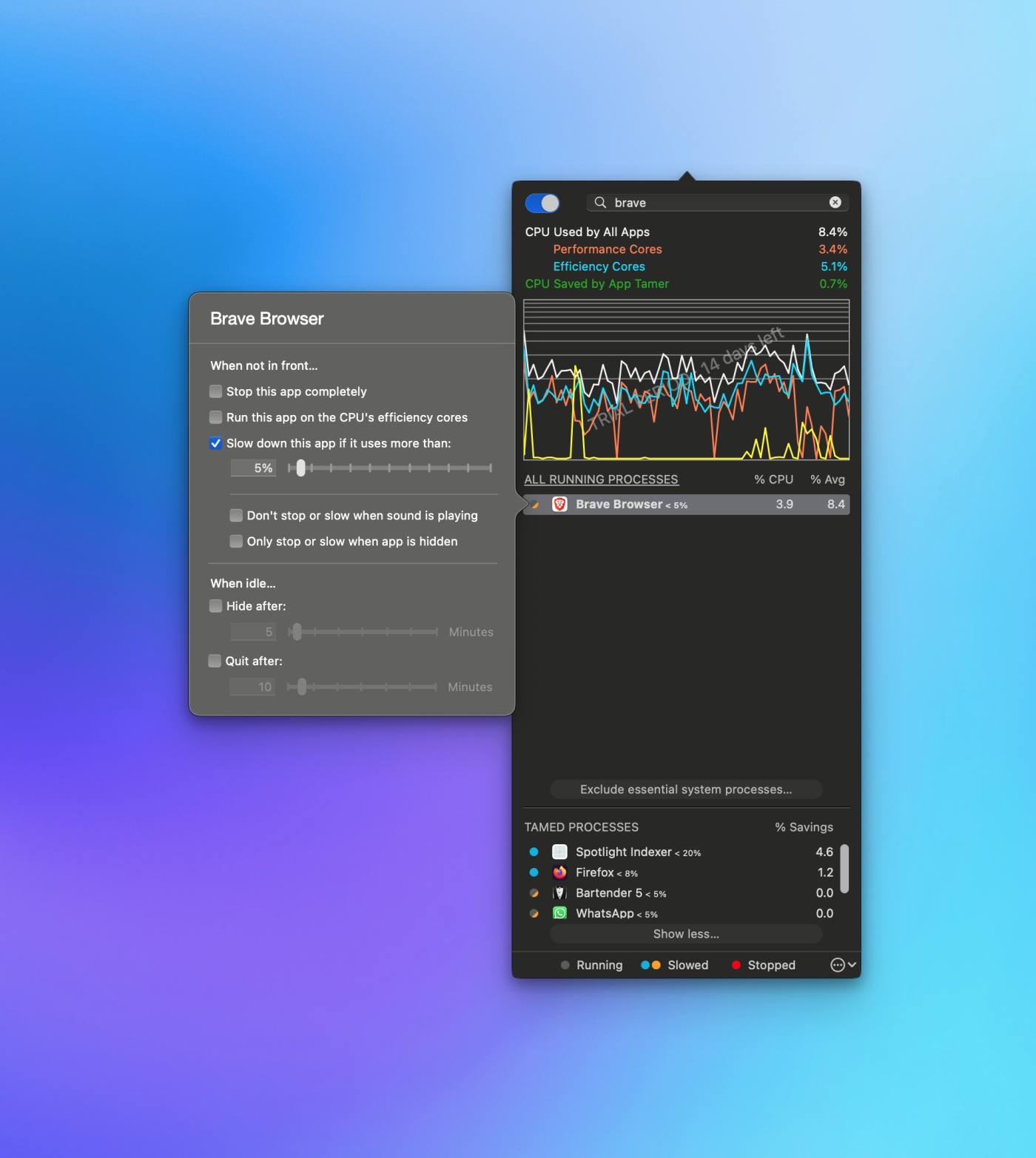
How to use App Tamer to save system resources (Photo: Lifehacker)
Settings to make most of App Tamer
One of App Tamer’s best-advanced settings allows you to select which CPU cores an app can use. Mac CPUs have performance and efficiency cores, and with this feature, you can direct resource-intensive applications to performance cores while running relatively lightweight ones exclusively on efficiency cores to extend battery life.
App Tamer settings also include several interesting options. On the Control page, you can set various conditions for App Tamer’s features.
For instance, you can disable any type of throttling when your MacBook is charging, and the battery level is above a certain threshold. Furthermore, you can set a delay before resource limitations take effect.
The ideal setup would be configuring App Tamer to launch at Mac boot-up. This will allow the app to operate uninterruptedly and perform its tasks automatically.
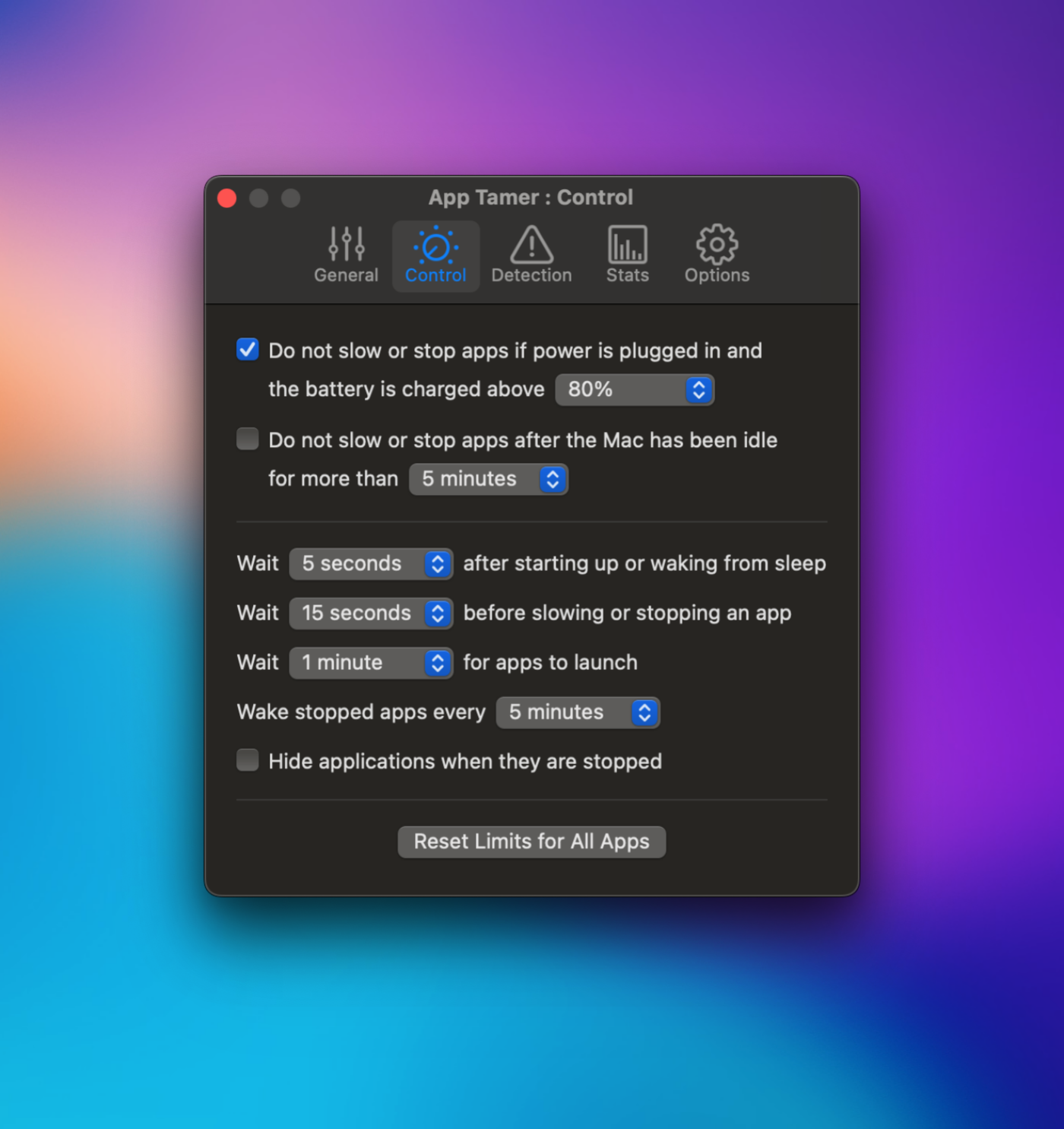
Configure App Tamer for maximum usage. (Photo: Lifehacker)
Every MacBook user wants their device to run as quickly and efficiently as possible. However, even the most powerful computers can slow down due to apps that excessively consume system resources. Fortunately, there is a way to address this problem and optimize your device’s performance, the world-leading technology and lifestyle advice site Lifehacker reports.
How to use App Tamer to conserve system resources
After installing App Tamer, it operates entirely through the menu bar. You can click on the icon in the menu bar at any time to view a list of all current applications and see how much power they take.
For convenience, you can use the search bar to find applications that overload the system or scroll through the list of all running apps to identify which ones need attention (e.g., Chrome).
When you find an app consuming too many system resources, click on it and select Slow this app down if it uses a lot of resources. Below this option, there is a slider that allows you to set a percentage limit – the maximum percentage of CPU resources this app can use.
You can set the value to 5 percent or even less for simple programs, such as menu bar utilities.
For most users, browsers are likely to top the list of resource consumers. In this case, App Tamer offers a few additional options. After setting a CPU usage limit, you will see two extra settings:
-
Do not slow down or stop if the sound is playing;
-
Stop or slow down only when the app is hidden.
The first option is useful to ensure your browser doesn’t slow to a crawl when you’re watching Netflix. The second allows you to limit an app’s CPU usage only when it is not actively used.
Thanks to such detailed settings, you can avoid situations where App Tamer slows down apps unnecessarily.
It is important to note that App Tamer does not consider an app “hidden” simply because you minimized it or switched to another window. For App Tamer, an app becomes hidden only after you manually hide it.
To bypass this limitation, App Tamer allows you to automatically hide applications that have been inactive for a certain amount of time. This setting is available in the While Idle menu in the same window where you limit CPU resources.
Another useful feature of App Tamer is the automatic closing of apps that remain inactive for a long time. This functionality works similarly to MagicQuit.
How to use App Tamer to save system resources (Photo: Lifehacker)
Settings to make most of App Tamer
One of App Tamer’s best-advanced settings allows you to select which CPU cores an app can use. Mac CPUs have performance and efficiency cores, and with this feature, you can direct resource-intensive applications to performance cores while running relatively lightweight ones exclusively on efficiency cores to extend battery life.
App Tamer settings also include several interesting options. On the Control page, you can set various conditions for App Tamer’s features.
For instance, you can disable any type of throttling when your MacBook is charging, and the battery level is above a certain threshold. Furthermore, you can set a delay before resource limitations take effect.
The ideal setup would be configuring App Tamer to launch at Mac boot-up. This will allow the app to operate uninterruptedly and perform its tasks automatically.
Configure App Tamer for maximum usage. (Photo: Lifehacker)
Every MacBook user wants their device to run as quickly and efficiently as possible. However, even the most powerful computers can slow down due to apps that excessively consume system resources. Fortunately, there is a way to address this problem and optimize your device’s performance, the world-leading technology and lifestyle advice site Lifehacker reports.
How to use App Tamer to conserve system resources
After installing App Tamer, it operates entirely through the menu bar. You can click on the icon in the menu bar at any time to view a list of all current applications and see how much power they take.
For convenience, you can use the search bar to find applications that overload the system or scroll through the list of all running apps to identify which ones need attention (e.g., Chrome).
When you find an app consuming too many system resources, click on it and select Slow this app down if it uses a lot of resources. Below this option, there is a slider that allows you to set a percentage limit – the maximum percentage of CPU resources this app can use.
You can set the value to 5 percent or even less for simple programs, such as menu bar utilities.
For most users, browsers are likely to top the list of resource consumers. In this case, App Tamer offers a few additional options. After setting a CPU usage limit, you will see two extra settings:
-
Do not slow down or stop if the sound is playing;
-
Stop or slow down only when the app is hidden.
The first option is useful to ensure your browser doesn’t slow to a crawl when you’re watching Netflix. The second allows you to limit an app’s CPU usage only when it is not actively used.
Thanks to such detailed settings, you can avoid situations where App Tamer slows down apps unnecessarily.
It is important to note that App Tamer does not consider an app “hidden” simply because you minimized it or switched to another window. For App Tamer, an app becomes hidden only after you manually hide it.
To bypass this limitation, App Tamer allows you to automatically hide applications that have been inactive for a certain amount of time. This setting is available in the While Idle menu in the same window where you limit CPU resources.
Another useful feature of App Tamer is the automatic closing of apps that remain inactive for a long time. This functionality works similarly to MagicQuit.
How to use App Tamer to save system resources (Photo: Lifehacker)
Settings to make most of App Tamer
One of App Tamer’s best-advanced settings allows you to select which CPU cores an app can use. Mac CPUs have performance and efficiency cores, and with this feature, you can direct resource-intensive applications to performance cores while running relatively lightweight ones exclusively on efficiency cores to extend battery life.
App Tamer settings also include several interesting options. On the Control page, you can set various conditions for App Tamer’s features.
For instance, you can disable any type of throttling when your MacBook is charging, and the battery level is above a certain threshold. Furthermore, you can set a delay before resource limitations take effect.
The ideal setup would be configuring App Tamer to launch at Mac boot-up. This will allow the app to operate uninterruptedly and perform its tasks automatically.
Configure App Tamer for maximum usage. (Photo: Lifehacker)
Татьяна Доронина. «Ночь перед Волшебством». pic.twitter.com/YInFAfVBCG
— Художники и Поэты (@Xudozhnikipoeti) December 31, 2024
Many places in the world are considered mystical and special for making wishes. Some have a long history, while others have become popular due to unique traditions and legends.
Read about five places worth visiting on New Year’s Eve to make a wish and feel the magic of the festive night.
Stonehenge, England
Stonehenge is one of the most mysterious places in the world, shrouded in myths and legends. It is believed that this place has a special energy that helps to fulfill wishes. On New Year’s Eve, people from all over the world gather here to meet the dawn and make their most intimate wishes.
To make your wish come true, you need to touch one of the stones and mentally imagine your request. Even in winter, this place impresses with its grandeur and ancient atmosphere. It is said that it is here that nature and the universe “hear” the most sincere dreams. In addition to making wishes, this is a great opportunity to touch the history that dates back thousands of years.
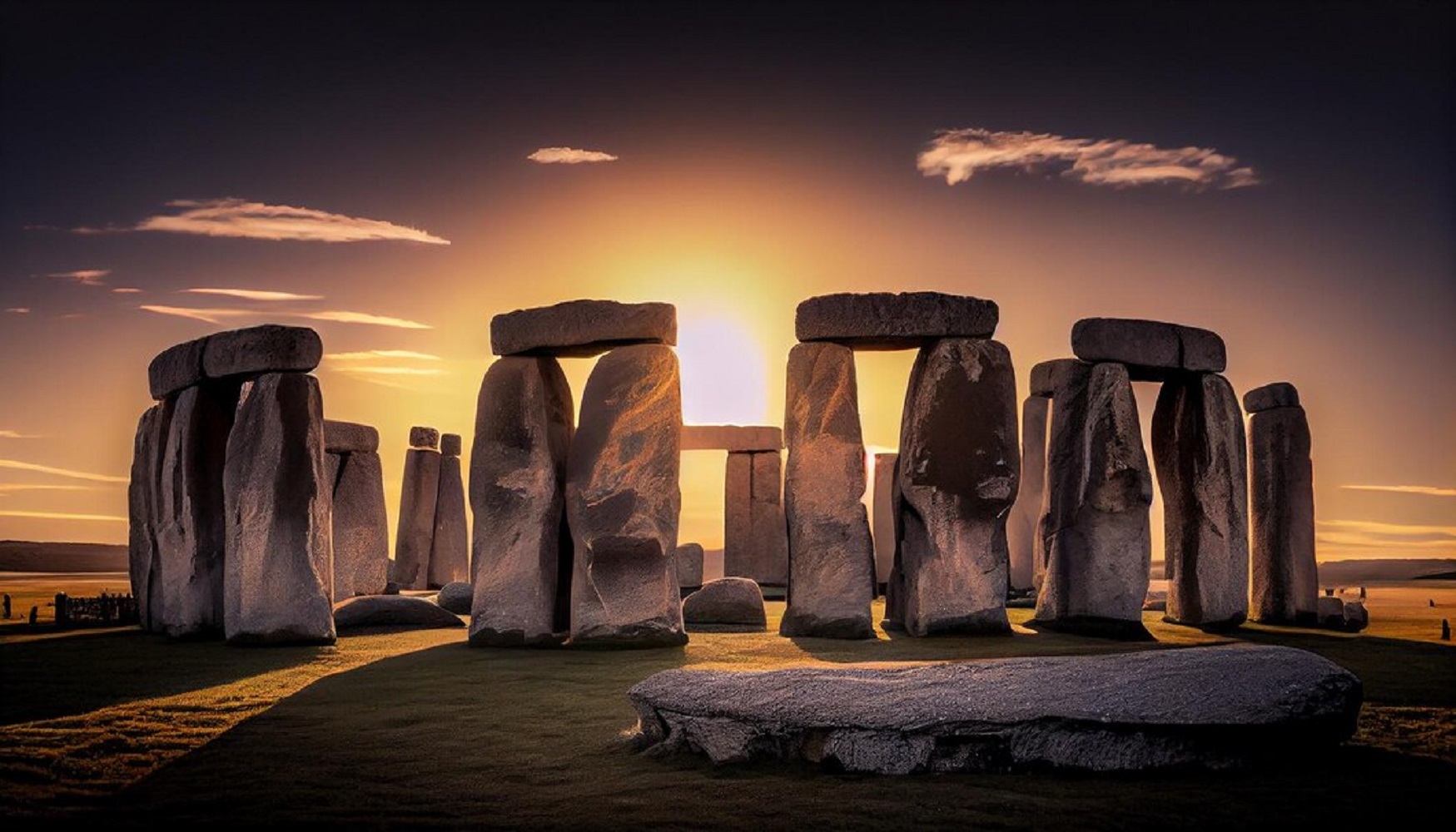 Stonehenge, England (photo: Freepik.com)
Meiji Temple, Japan
Meiji Temple is one of the most important shrines in Japan, where thousands of people celebrate the New Year. There is a tradition of the first bell, when the bell rings 108 times, symbolically cleansing the soul of sins. At this moment, it is customary to make wishes, as it is believed that the bell opens the way to spiritual renewal.
To make wishes, people bring wooden “ema” plates and write their dreams on them. The atmosphere of the temple is filled with peace, harmony and hope for the best. In addition, you can admire the unique architecture of the temple and feel the spirit of Japanese traditions. Many people believe that a wish written on an ema will come true in the new year.
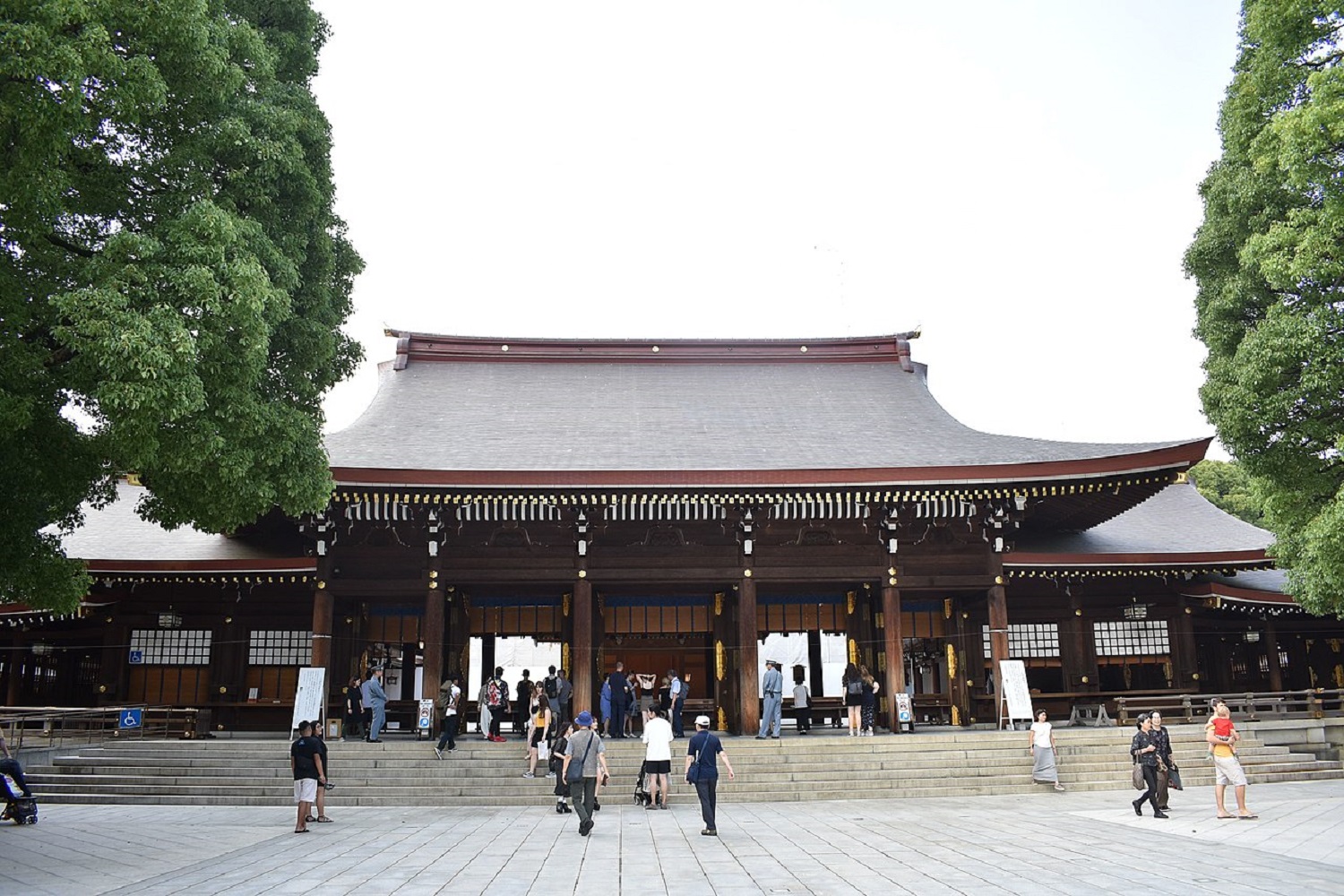 Meiji Temple, Japan (photo: Wikipedia)
Mount Monserrat, Spain
This mountain is considered sacred and mystical, it is also called “the place where earth meets heaven”. Every year, on New Year’s Eve, pilgrims and tourists come here to make a wish near the Monserrate Monastery. Legend has it that the mountain gives energy to those who sincerely believe in making dreams come true.
It is especially popular to turn to the statue of the Black Madonna, which is considered miraculous. It is said that a wish made here will certainly come true if you leave a candle or a note under the statue. The local landscape is also breathtaking and conducive to meditation and reflection. Mount Montserrat has become a symbol of faith and hope for many generations.
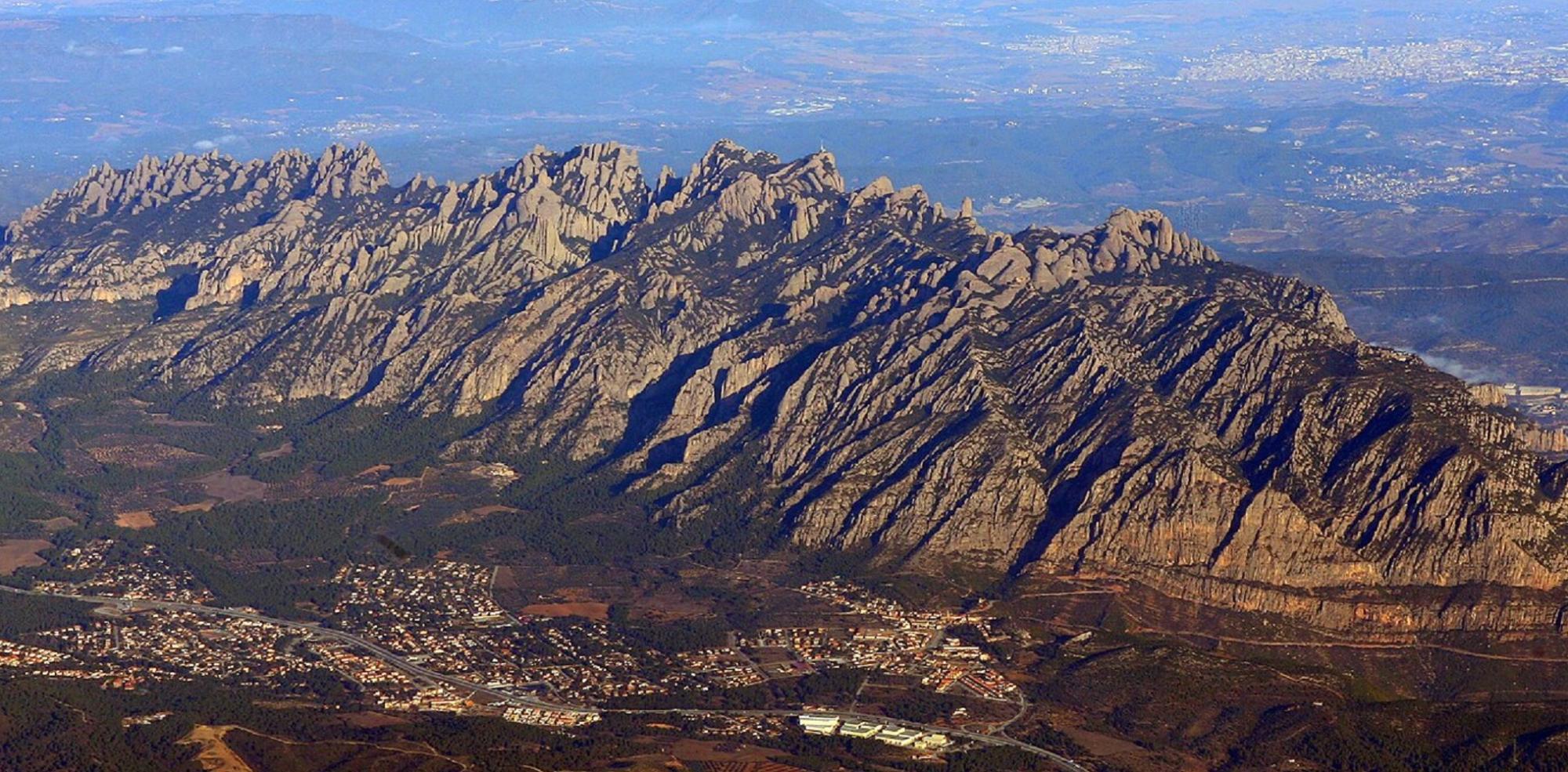 Mountain of Montserrat, Spain (photo: Wikipedia)
Iguazu Falls, Brazil-Argentina
Iguazu Falls is one of the greatest natural wonders of the world, which captures its beauty and energy. On New Year’s Eve, it is especially popular with tourists who believe that the local water has healing and magical properties.
To make a wish, you need to stand near the waterfall, feel its powerful energy, and say your wish out loud. Water symbolizes purification and a new beginning, which is ideal for making dreams on New Year’s Eve.
The unique atmosphere of water noise creates a sense of unity with nature. This place also gives the peace and inspiration necessary for new achievements in life. Tourists often leave small souvenirs here as a sign of their dreams coming true.
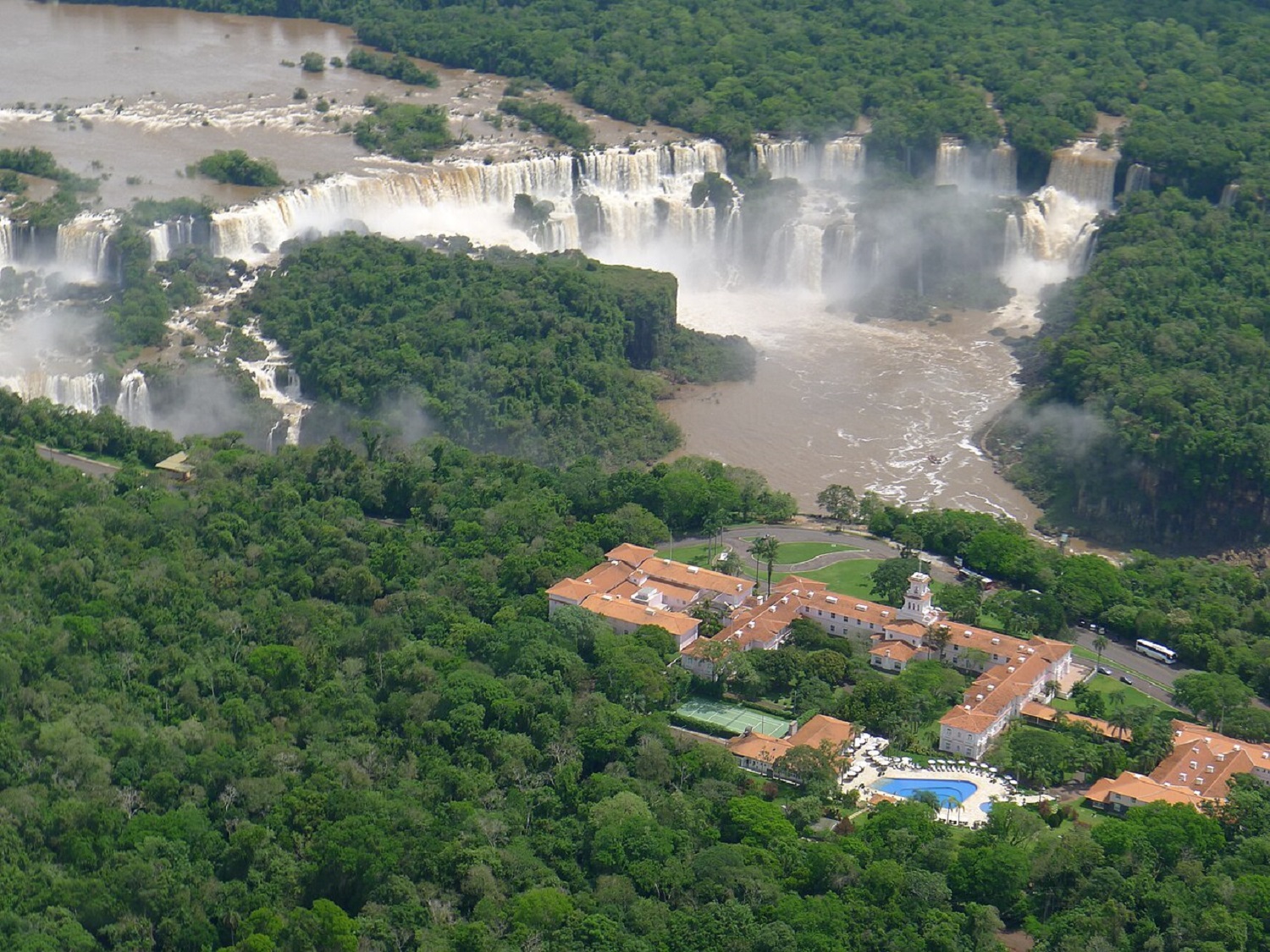 5 mystical places to make a wish for the New YearIguazu Falls, Brazil-Argentina (photo: Wikipedia)
Neuschwanstein Castle, Germany
Neuschwanstein Castle in Bavaria looks like it came from a fairy tale. This place is associated with magic, romance, and dreams, so tourists from all over the world come here to make wishes.
Legend has it that a wish made during the chiming of the clock on New Year’s Eve in this castle will come true. In winter, the castle is covered with snow, creating a perfect fairy-tale atmosphere. Visitors often leave notes with wishes at the main entrance, believing that the castle walls keep their secrets.
This place is also ideal for watching New Year’s fireworks in Bavaria. In addition, a walk around the castle surroundings fills your heart with warmth and faith in miracles.
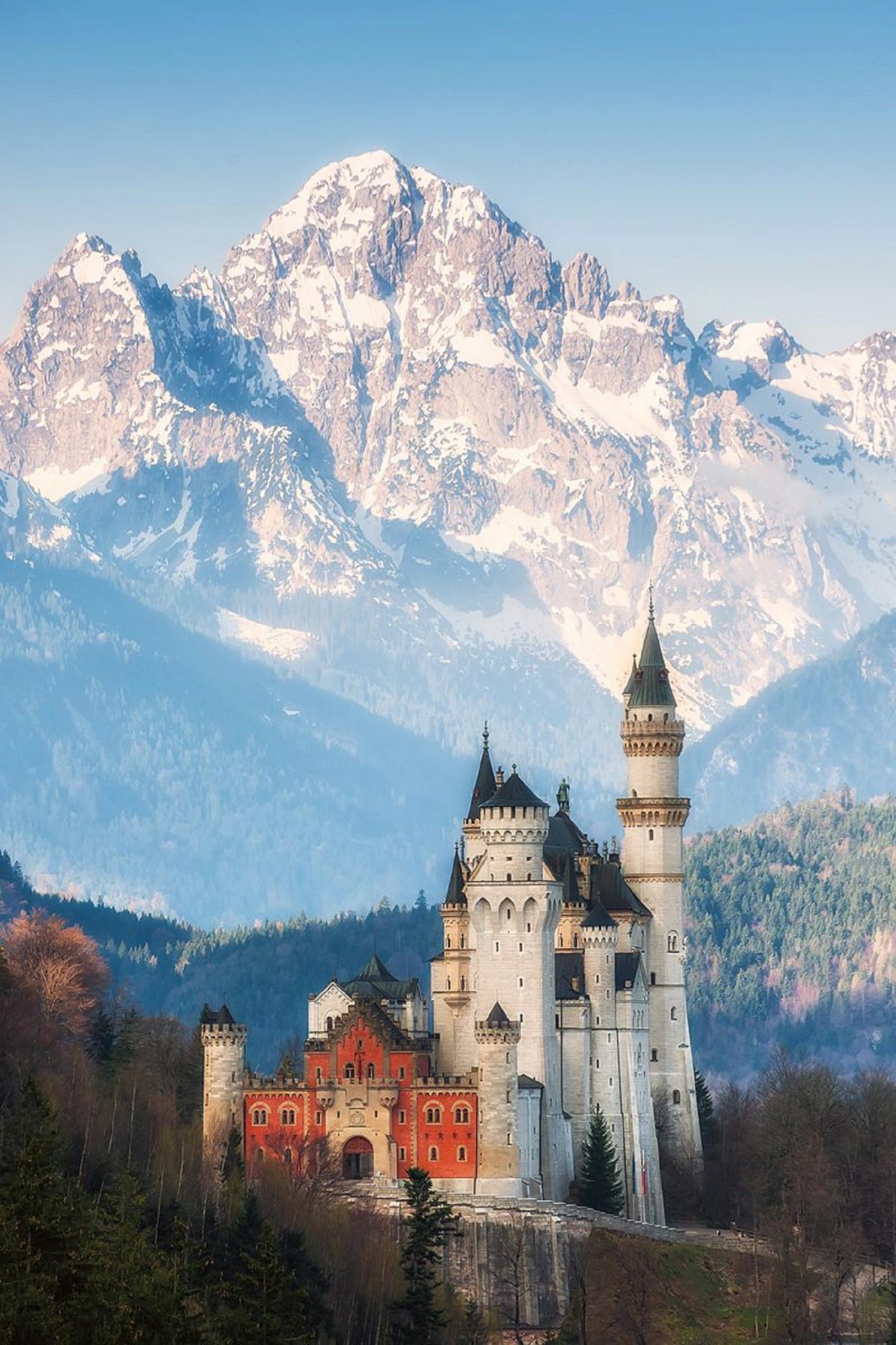 Neuschwanstein Castle, Germany (photo: Wikipedia)
Sources: Listverse, Elfontheshelf.com, Wikipedia.
Many places in the world are considered mystical and special for making wishes. Some have a long history, while others have become popular due to unique traditions and legends.
Read about five places worth visiting on New Year’s Eve to make a wish and feel the magic of the festive night.
Stonehenge, England
Stonehenge is one of the most mysterious places in the world, shrouded in myths and legends. It is believed that this place has a special energy that helps to fulfill wishes. On New Year’s Eve, people from all over the world gather here to meet the dawn and make their most intimate wishes.
To make your wish come true, you need to touch one of the stones and mentally imagine your request. Even in winter, this place impresses with its grandeur and ancient atmosphere. It is said that it is here that nature and the universe “hear” the most sincere dreams. In addition to making wishes, this is a great opportunity to touch the history that dates back thousands of years.
Stonehenge, England (photo: Freepik.com)
Meiji Temple, Japan
Meiji Temple is one of the most important shrines in Japan, where thousands of people celebrate the New Year. There is a tradition of the first bell, when the bell rings 108 times, symbolically cleansing the soul of sins. At this moment, it is customary to make wishes, as it is believed that the bell opens the way to spiritual renewal.
To make wishes, people bring wooden “ema” plates and write their dreams on them. The atmosphere of the temple is filled with peace, harmony and hope for the best. In addition, you can admire the unique architecture of the temple and feel the spirit of Japanese traditions. Many people believe that a wish written on an ema will come true in the new year.
Meiji Temple, Japan (photo: Wikipedia)
Mount Monserrat, Spain
This mountain is considered sacred and mystical, it is also called “the place where earth meets heaven”. Every year, on New Year’s Eve, pilgrims and tourists come here to make a wish near the Monserrate Monastery. Legend has it that the mountain gives energy to those who sincerely believe in making dreams come true.
It is especially popular to turn to the statue of the Black Madonna, which is considered miraculous. It is said that a wish made here will certainly come true if you leave a candle or a note under the statue. The local landscape is also breathtaking and conducive to meditation and reflection. Mount Montserrat has become a symbol of faith and hope for many generations.
Mountain of Montserrat, Spain (photo: Wikipedia)
Iguazu Falls, Brazil-Argentina
Iguazu Falls is one of the greatest natural wonders of the world, which captures its beauty and energy. On New Year’s Eve, it is especially popular with tourists who believe that the local water has healing and magical properties.
To make a wish, you need to stand near the waterfall, feel its powerful energy, and say your wish out loud. Water symbolizes purification and a new beginning, which is ideal for making dreams on New Year’s Eve.
The unique atmosphere of water noise creates a sense of unity with nature. This place also gives the peace and inspiration necessary for new achievements in life. Tourists often leave small souvenirs here as a sign of their dreams coming true.
5 mystical places to make a wish for the New YearIguazu Falls, Brazil-Argentina (photo: Wikipedia)
Neuschwanstein Castle, Germany
Neuschwanstein Castle in Bavaria looks like it came from a fairy tale. This place is associated with magic, romance, and dreams, so tourists from all over the world come here to make wishes.
Legend has it that a wish made during the chiming of the clock on New Year’s Eve in this castle will come true. In winter, the castle is covered with snow, creating a perfect fairy-tale atmosphere. Visitors often leave notes with wishes at the main entrance, believing that the castle walls keep their secrets.
This place is also ideal for watching New Year’s fireworks in Bavaria. In addition, a walk around the castle surroundings fills your heart with warmth and faith in miracles.
Neuschwanstein Castle, Germany (photo: Wikipedia)
Sources: Listverse, Elfontheshelf.com, Wikipedia.
Орест Кипренский. «Портрет Екатерины Семёновны Семёновой в роли Клеопатры». Музей В.А.Тропинина. Москва. pic.twitter.com/NyInmVZNEY
— Художники и Поэты (@Xudozhnikipoeti) December 31, 2024
Глущенко Ирина. «Пускай все сбудется». Холст, масло. 30х40 см. 2018 г. pic.twitter.com/pXjCA0FDqs
— Художники и Поэты (@Xudozhnikipoeti) December 31, 2024
Over the past 24 hours, from December 30 to December 31, Russian forces have lost 1,610 soldiers, five tanks, and 27 troop-carrying AFVs in the war in Ukraine, reports the General Staff of the Armed Forces of Ukraine.
The total combat Russian losses from February 24, 2022, to December 31, 2024, are estimated to be:
- personnel – about 789,550 (+1,610) Russian troops were eliminated;
- tanks – 9,668 (+5);
- troop-carrying AFVs – 20,030 (+27);
- artillery systems – 21,528 (+34);
- MLRS – 1,256;
- anti-aircraft warfare systems – 1,032;
- airplanes – 369;
- helicopters – 329;
- UAV operational-tactical level – 21,081 (+12);
- cruise missiles – 3,003;
- warships/boats – 28;
- submarines – 1;
- vehicles and fuel tanks – 32,626 (+75);
- special equipment – 3,671 (+1).
Frontline situation and Russian shelling
According to the Institute for the Study of War (ISW), Ukrainian Defense Forces have advanced near Chasiv Yar, Toretsk, and Pokrovsk. However, Russian forces made gains near Kurakhove, Vuhledar, and Velyka Novosilka.
Overnight, Russian forces attacked Ukraine with Shahed kamikaze drones. In the Kyiv region, air defense forces intercepted the enemy drones.
The Russian military also launched ballistic missiles at Ukraine.